
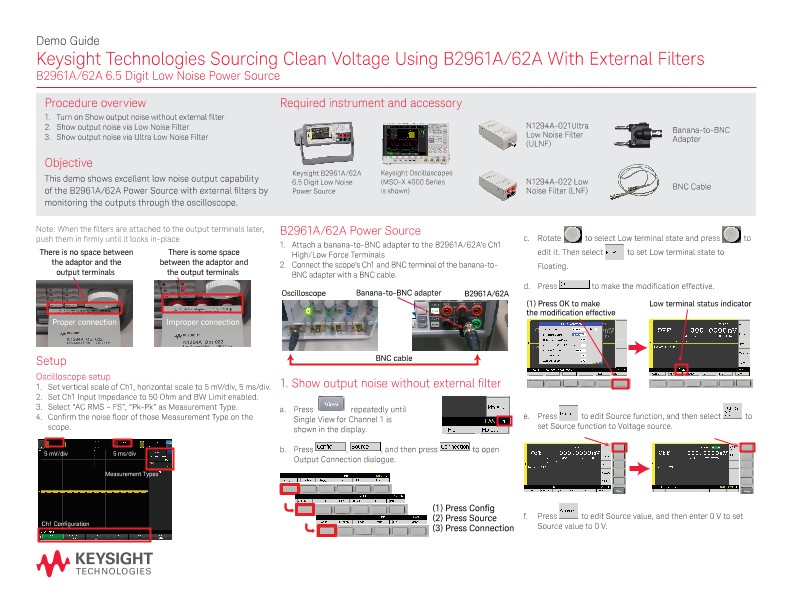
Sourcing Clean Voltage Using B2961A/62A with External Filters
散页
Demo Guide
Keysight Technologies Sourcing Clean Voltage Using B2961A/62A With External Filters
B2961A/62A 6.5 Digit Low Noise Power Source
Procedure overview
1. Turn on Show output noise without external filter
2. Show output noise via Low Noise Filter
3. Show output noise via Ultra Low Noise Filter
Objective
This demo shows excellent low noise output capability of the B2961A/62A Power Source with external filters by monitoring the outputs through the oscilloscope.
Required instrument and accessory
Setup
Oscilloscope setup
1. Set vertical scale of Ch1, horizontal scale to 5 mV/div, 5 ms/div.
2. Set Ch1 Input Impedance to 50 Ohm and BW Limit enabled.
3. Select “AC RMS – FS”, “Pk-Pk” as Measurement Type.
4. Confirm the noise floor of those Measurement Type on the scope.
B2961A/62A Power Source
1. Attach a banana-to-BNC adapter to the B2961A/62A’s Ch1 High/Low Force Terminals
2. Connect the scope’s Ch1 and BNC terminal of the banana-toBNC adapter with a BNC cable.
1. Show output noise without external filter
2. Show output noise via low noise filter
3. Showing output noise via ultra low noise filter