What are you looking for?
U1253A Firmware (Version V1.20)
System Requirements:
U1253A Firmware (Version V1.20) will run using the recommended minimum PC operating requirement as follow:
Processor type or minimum speed, etc. - 1.0 GHZ Pentium III or higher
Minimum memory - 256 MB or higher recommended
Minimum mass storage - 1 GB
32-bit Platforms
32-bit Platforms Windows 2000, Windows XP and Windows Vista.
Supported Model
Keysight U1253A
Note:
Please connect the U1253A OLED DMM to your PC using the U1173A IR-USB cable. The U1173A is sold separately.
Firmware Update Instructions
Please follow U1253A firmware update procedures as below:
1. Click setup.exe to begin installation setup.
2. After completely installed, you can find a FlashDownload directory from window start up menu.
3. The Keysight U1253A Firmware Update utility box will appear.
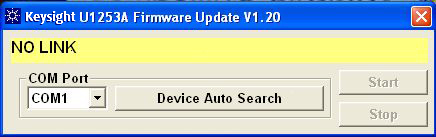
4. Click on Device Auto Search to auto select the correct COM port.
5. Click on Start to update the firmware.
| 发布日期 | 版本 | 版本说明 |
|---|---|---|
| 2009-05-25 | 1.20 | Download the latest version of firmware for your U1253A. |
| 发布日期 | 版本 |
|---|---|
| 2009-05-25 | 1.20 |
| Version Description |
|---|
| Download the latest version of firmware for your U1253A. |
如何下载
- See Above
如何安装
- See Above
颁发许可证
- Does Not Require a License
Installs on: Instrument
操作系统
- Windows Vista
- Windows XP
- Windows 2000
前提要求
- See Above
支持的仪器
- U1253A