What are you looking for?
RF System Design (SystemVue) 2026 Update 1.0 Product Release
Highlights
SystemVue 2026 Update 1.0 extends RF and antenna digital twins with AI-assisted automation, richer hardware modeling and new tools for design exploration. Connect AI assistants through the integrated Model Context Protocol (MCP) server, automate studies with Python APIs, and evaluate system performance before committing to hardware. Use a modern, consistent Windows and Linux workspace to move from architecture decisions to simulation-backed verification.
- AI-assisted design and validation. Use MCP and Python APIs to configure designs, orchestrate simulation studies, analyze results and connect simulation evidence to broader engineering workflows.
- Interactive product guidance. Find documentation, API information and examples through integrated Keysight EDA Chat.
- More realistic RF digital twins. Extend Spectrasys 2 workflows with enhanced RF_Link support for frequency-dependent devices, measured nonlinearities and mixer spurs.
- Enhanced phased-array analysis. Evaluate phase noise, thermal effects, polarization-dependent performance and temperature-driven gain and phase changes.
- New design exploration tools. Use EDA Optimizer to search design variables against performance goals and EBM Importer to turn measured or simulated data into reusable behavioral models.
- Expanded application validation. Explore enhanced NTN visualization and beam pairing, new Wi-Fi 7/8 TX/RX models and RF-impairment examples, GPS L5 modeling and more realistic radar target fluctuations.
System Design (SystemVue) 2026 Update 1.0 is available now!

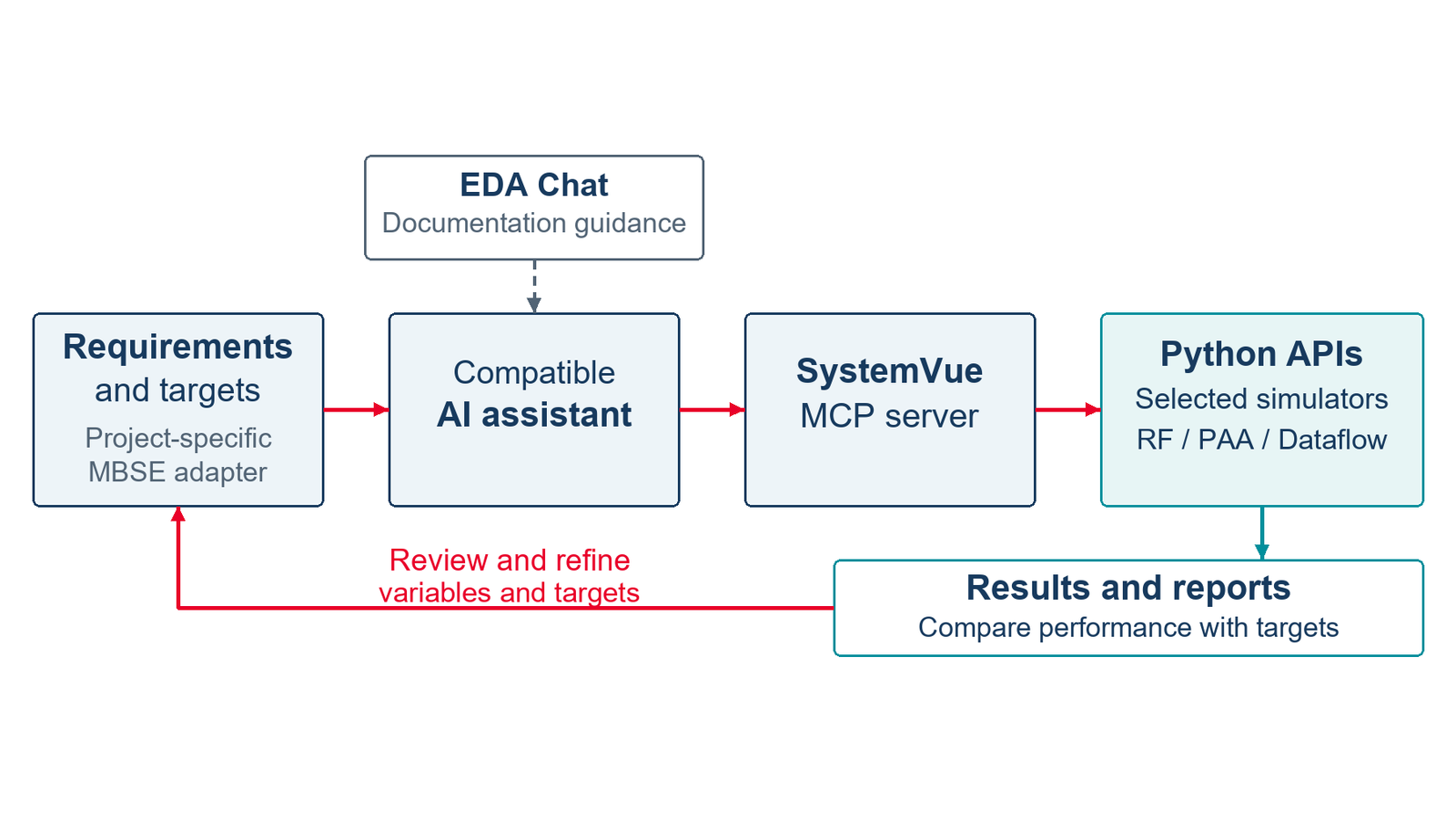
MCP and Python connect AI-assisted tasks to executable SystemVue studies and verification evidence. Requirements and external engineering tools connect through project-specific integrations.
AI Assisted Design Automation with MCP and Python
Bring compatible AI assistants into the SystemVue workflow through the integrated MCP server. Discover and connect to SystemVue sessions, access documentation and API guidance, inspect workspaces, and execute Python-driven design and analysis tasks from an agentic environment.
The Python APIs provide programmatic access to schematics, components, connections, parameters, analyses and datasets. Combine these capabilities to create repeatable workflows that configure a design, sweep operating conditions, run simulations or optimization, and collect results. For example, an AI assistant can help prepare a parameter study, compare simulated performance with targets, and generate a results summary using the underlying SystemVue analyses.
Custom Python integrations can connect requirements, design variables and simulation evidence to model-based systems engineering (MBSE) processes. The same approach can coordinate RFIC-to-system studies with external design tools through their supported interfaces.2
EDA Chat for Product Guidance
Ask SystemVue questions in the integrated Keysight EDA Chat window and receive guidance grounded in product documentation, Python API references and examples, with links to supporting sources. Configurable Desktop and Enterprise inference-server deployments support individual users and centrally managed teams.3

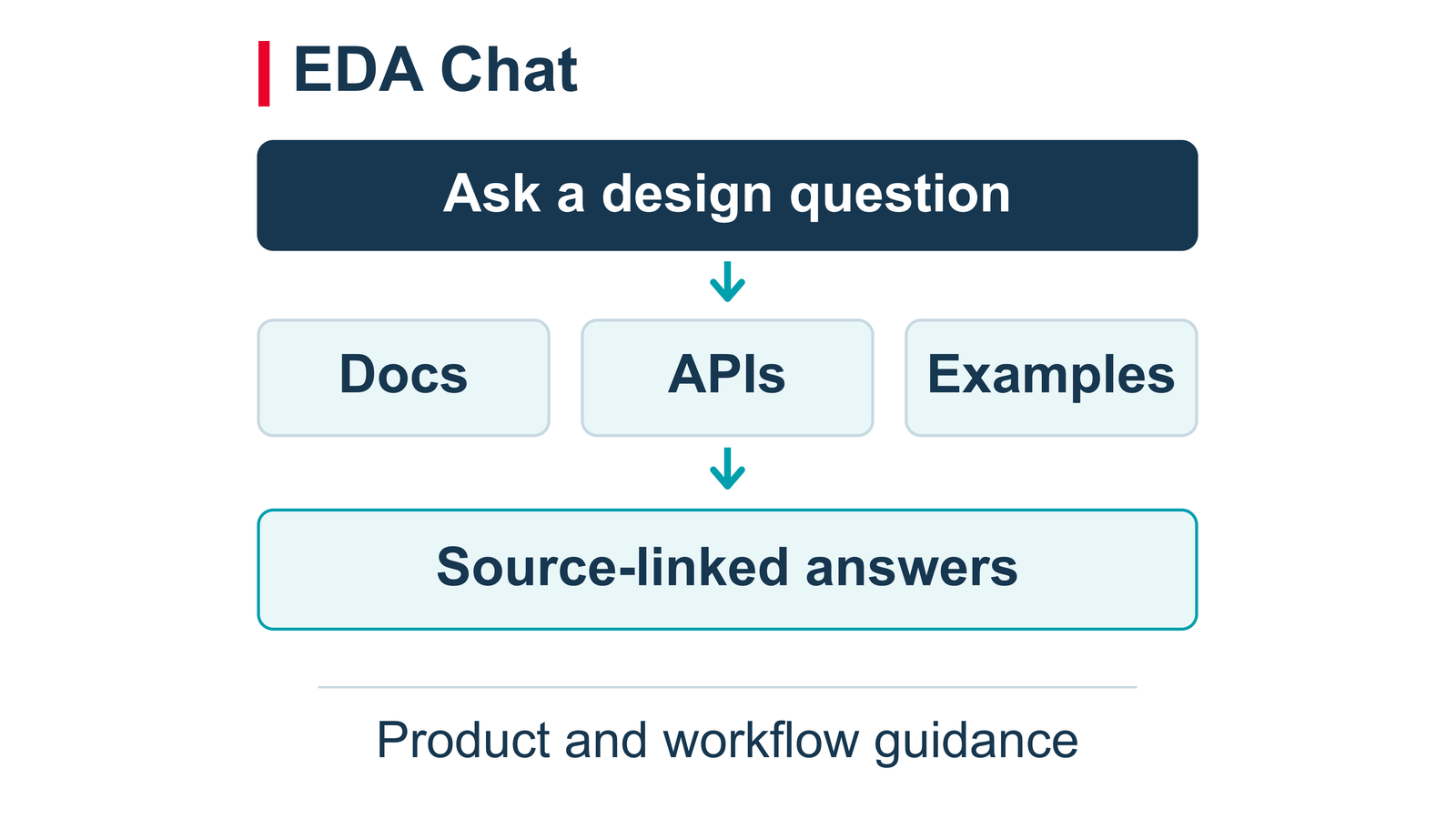
Conversational product guidance with source-linked answers.

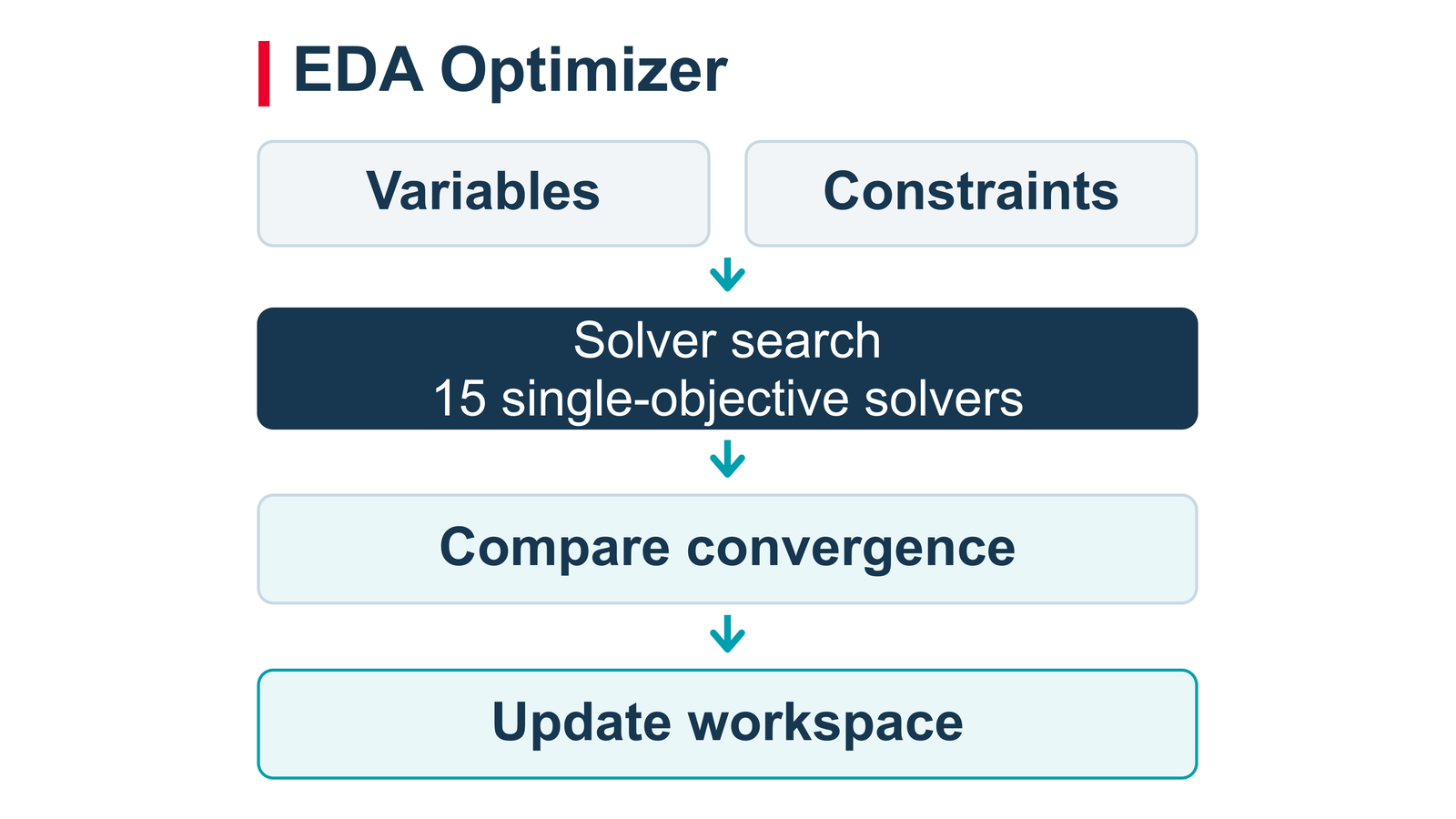
Set goals, compare solver behavior and update the selected design.
Design Exploration with EDA Optimizer
Define design variables and performance constraints, then select from 15 single-objective solvers to explore candidate designs. Compare solver convergence and results, inspect constraint performance, and apply the selected solution to the workspace. EDA Optimizer helps automate repeatable design tradeoff studies across RF and system parameters.1
RF System Analysis and Waveform Verification
Build on RF System Analysis (Spectrasys 2) with models that represent device behavior across frequency, power, bias and other operating conditions. Multi-Independent Parameters support realistic amplifier, variable-gain and mixer behavior, while measured intermodulation models capture nonlinear distortion into saturation.
SystemVue 2026 Update 1 expands RF_Link support for frequency-dependent components, even-order and multi-envelope measured intermods, VanDyke mixer two-tone spurs, external local-oscillator inputs and DC-controlled RF components. Connect RF architecture models to dataflow simulation to evaluate how gain, noise, phase noise and nonlinearities affect modulated waveforms, including EVM and adjacent-channel power.
Combine RF component models with antenna patterns, propagation loss and frequency-dependent environmental attenuation, including gases, rain, clouds, fog and tropospheric scintillation. Select the RF, waveform and phased-array analyses needed to assess each system metric.

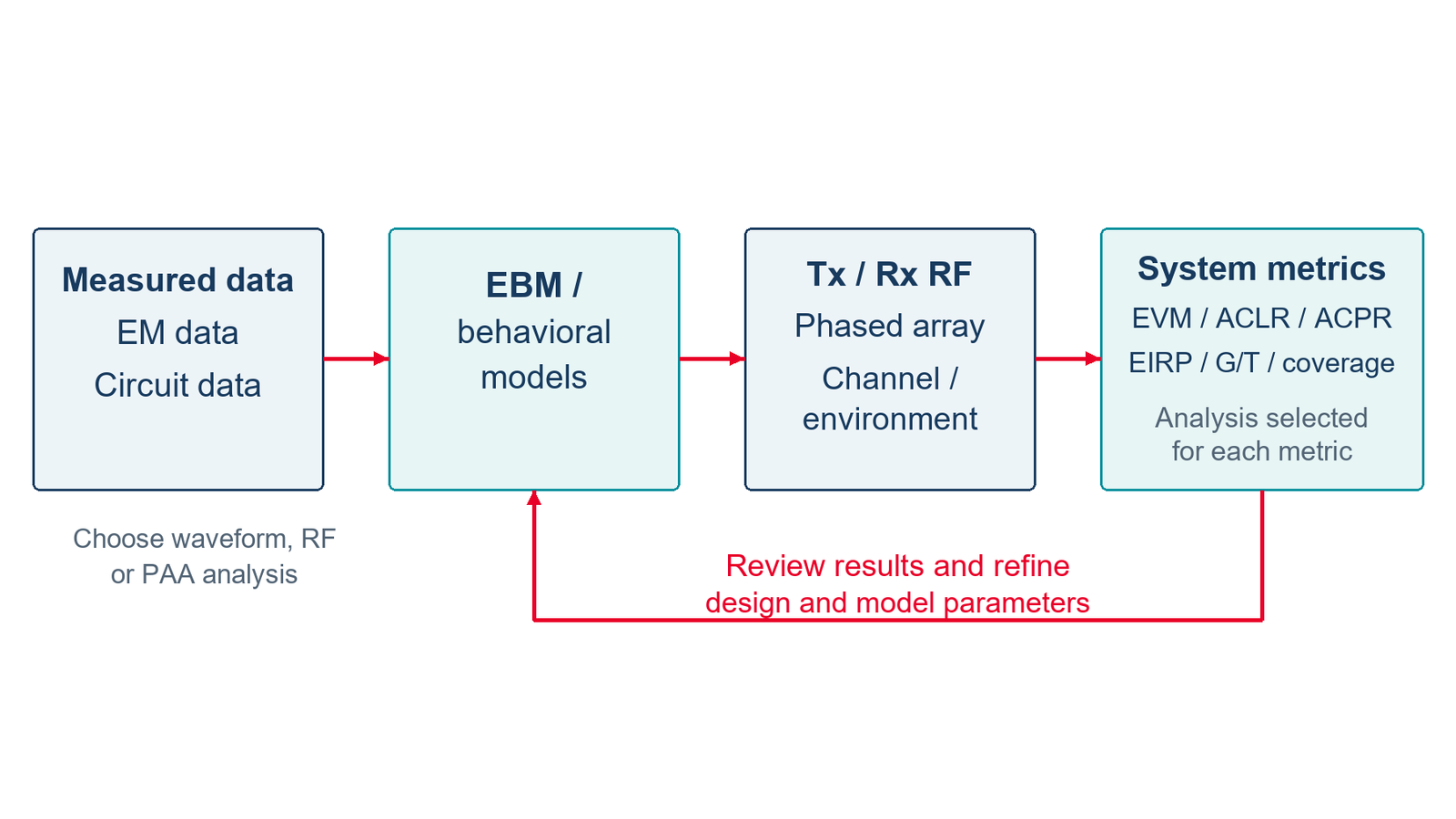
Measurement and simulation data inform RF digital twins. RF, waveform, phased-array and link analyses provide complementary metrics for design refinement.

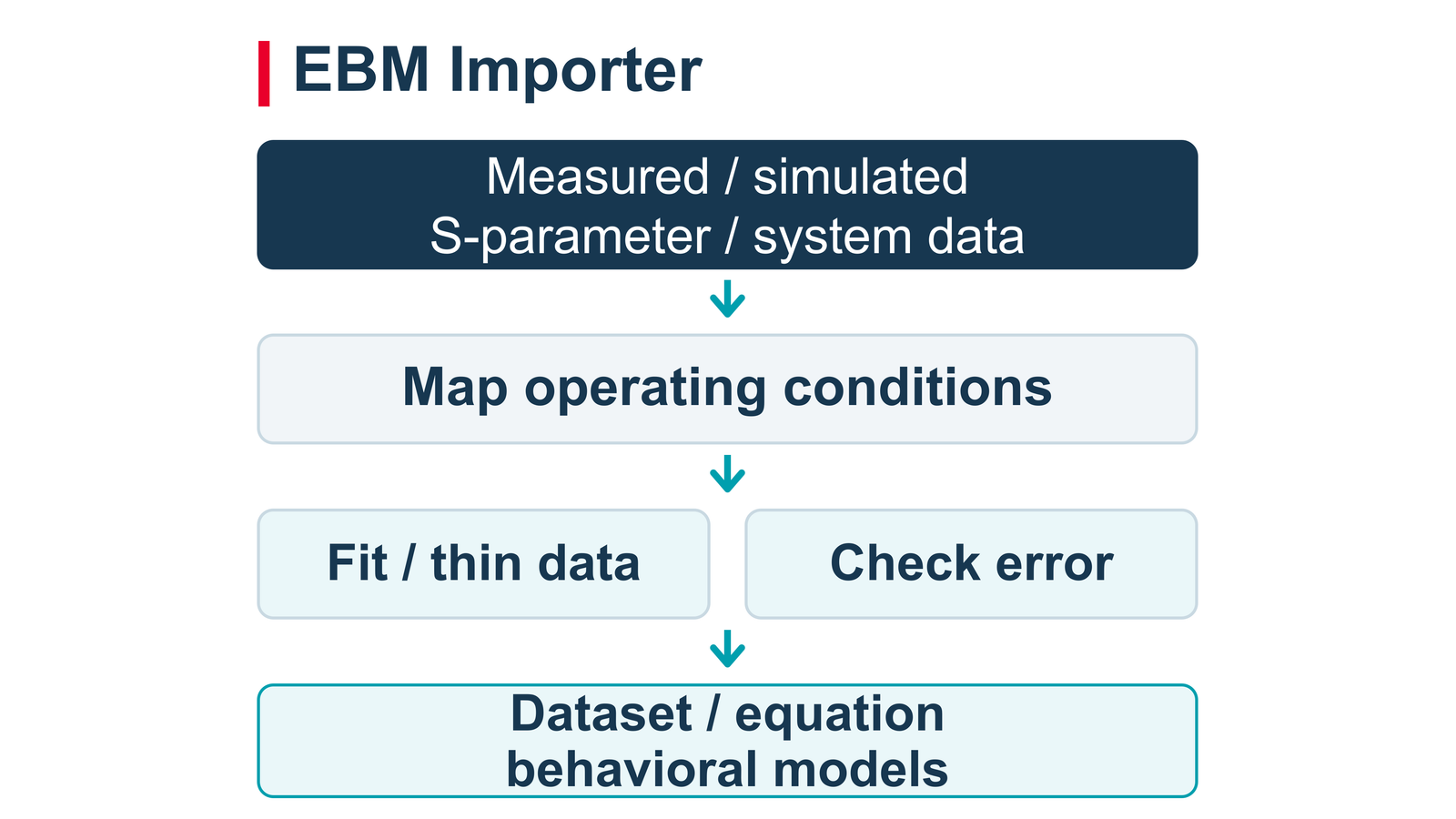
Convert component data into simulation-ready behavioral models.
Extracted Behavioral Models with EBM Importer
Convert measured or simulated S-parameter and system-parameter files into Extracted Behavioral Models (EBMs). Import single files, folders or multi-block data, map operating conditions, and generate SystemVue datasets, equation-based models or both. Fitting, frequency thinning and error checks help balance model size with fidelity, while statistical modeling supports studies of component variation.1
Dynamic Gain Model for Wideband Validation
Continue using the Dynamic Gain Model (DGM) to represent wideband nonlinear behavior and memory effects from measured data. Evaluate distortion, spectral regrowth and digital predistortion performance under realistic, modulated signals as part of the RF digital-twin workflow.

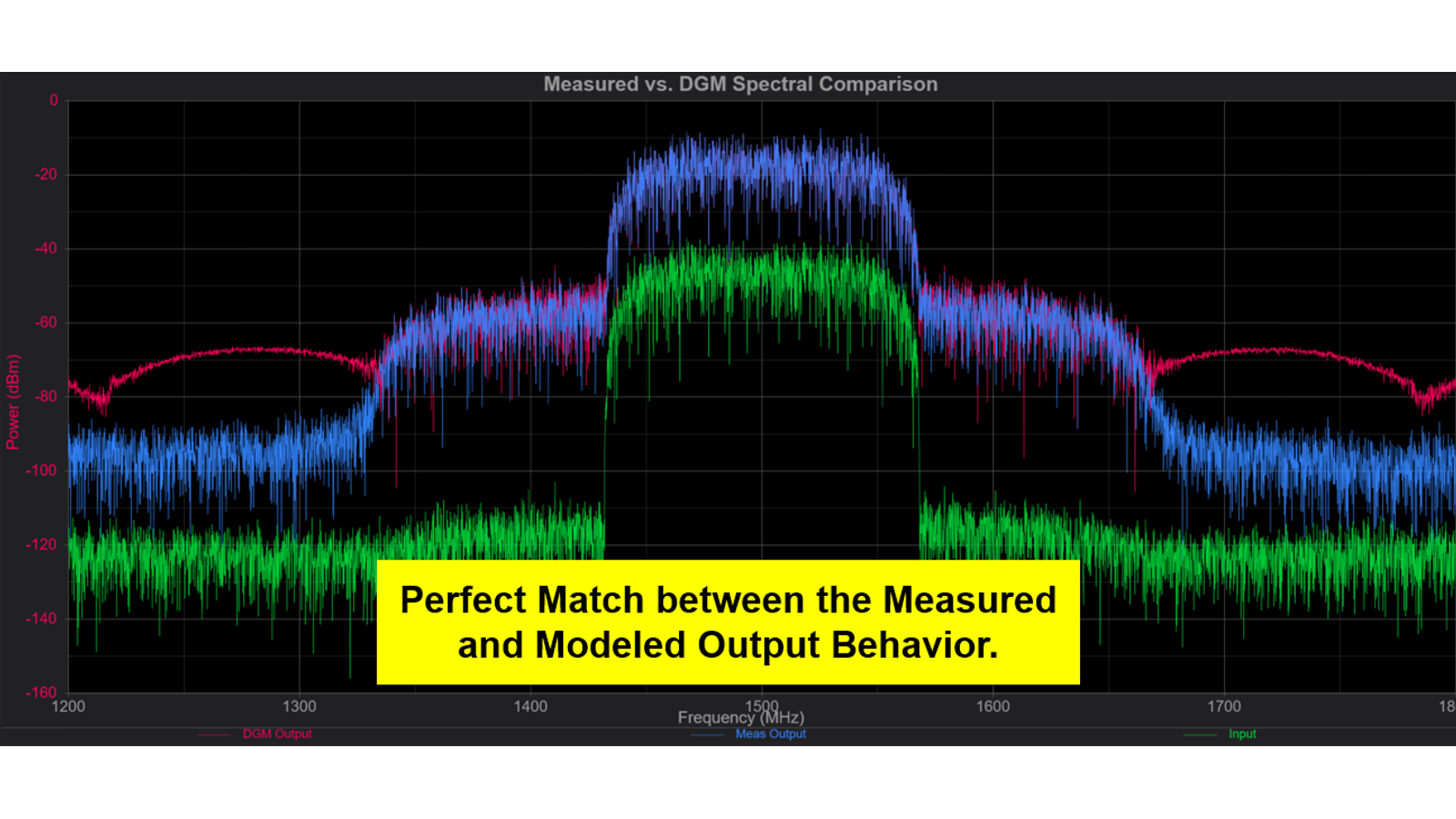
Measured and modeled output spectra from the supplied DGM example.

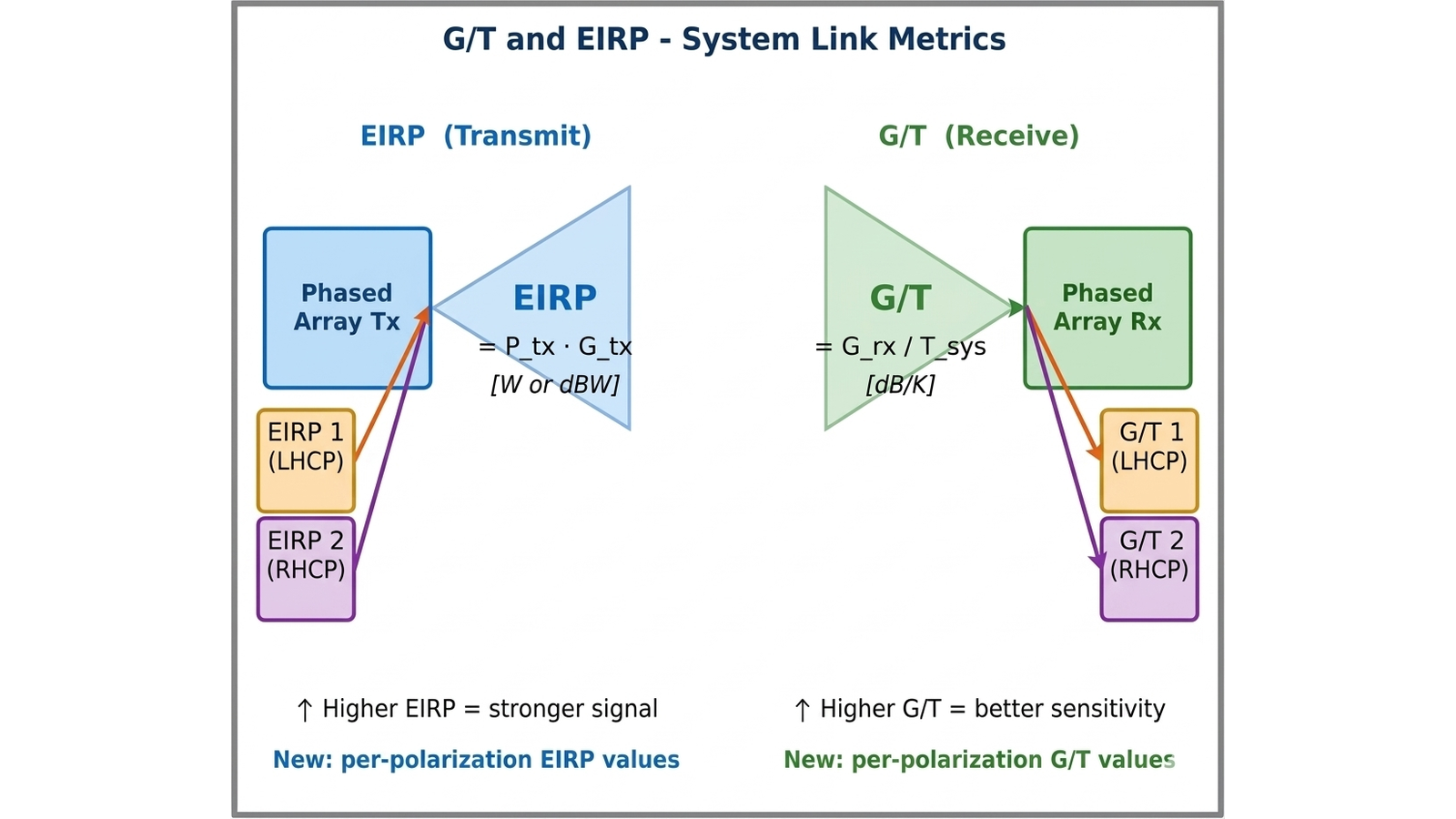
Polarization-aware transmit EIRP and receive G/T.

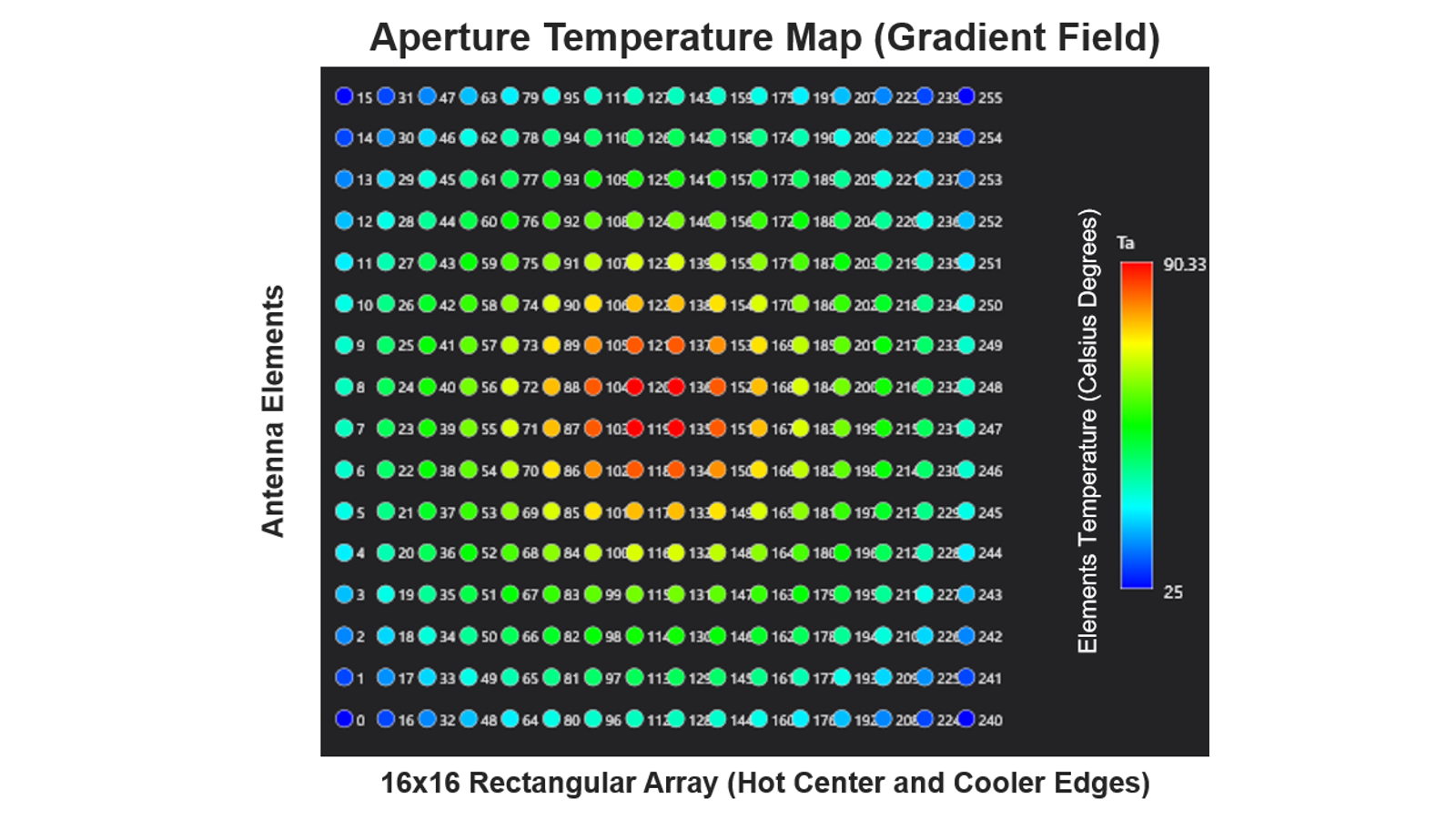
Array temperature gradients affect gain, phase and beam patterns.
Phased Array Analysis Enhancements
Update 1.0 extends Phased Array Analysis (PAA) with phase-noise and thermal-noise modeling through RF and microwave signal chains. Investigate noise contributions in transmit or receive array configurations and identify effects that can limit beamforming and system sensitivity.
New polarization-aware measurements include transmit EIRP, receive G/T, directivity and polarization-loss factors. Temperature-dependent gain and phase corrections model T/R-module variation and thermal gradients across the aperture, helping evaluate beam-pattern degradation and calibration needs.
These additions complement multi-beam analog beamforming, sub-band radiation patterns, time-delay steering and phase tapering introduced in the 2026 release. Combine RF chain behavior with antenna patterns and array impairments to assess wideband beam squint, beam steering and array performance.
NTN Coverage and Link Visualization
Extend NTN link-budget and coverage studies with enhanced examples for animated three-dimensional satellite trajectories, globe views and link-parameter plots using Python. Simplified single-time and time-sweep workflows make it easier to evaluate changing geometry and link conditions. New uplink and downlink phased-array beam-pairing examples demonstrate elevation-dependent steering and its effect on the link.

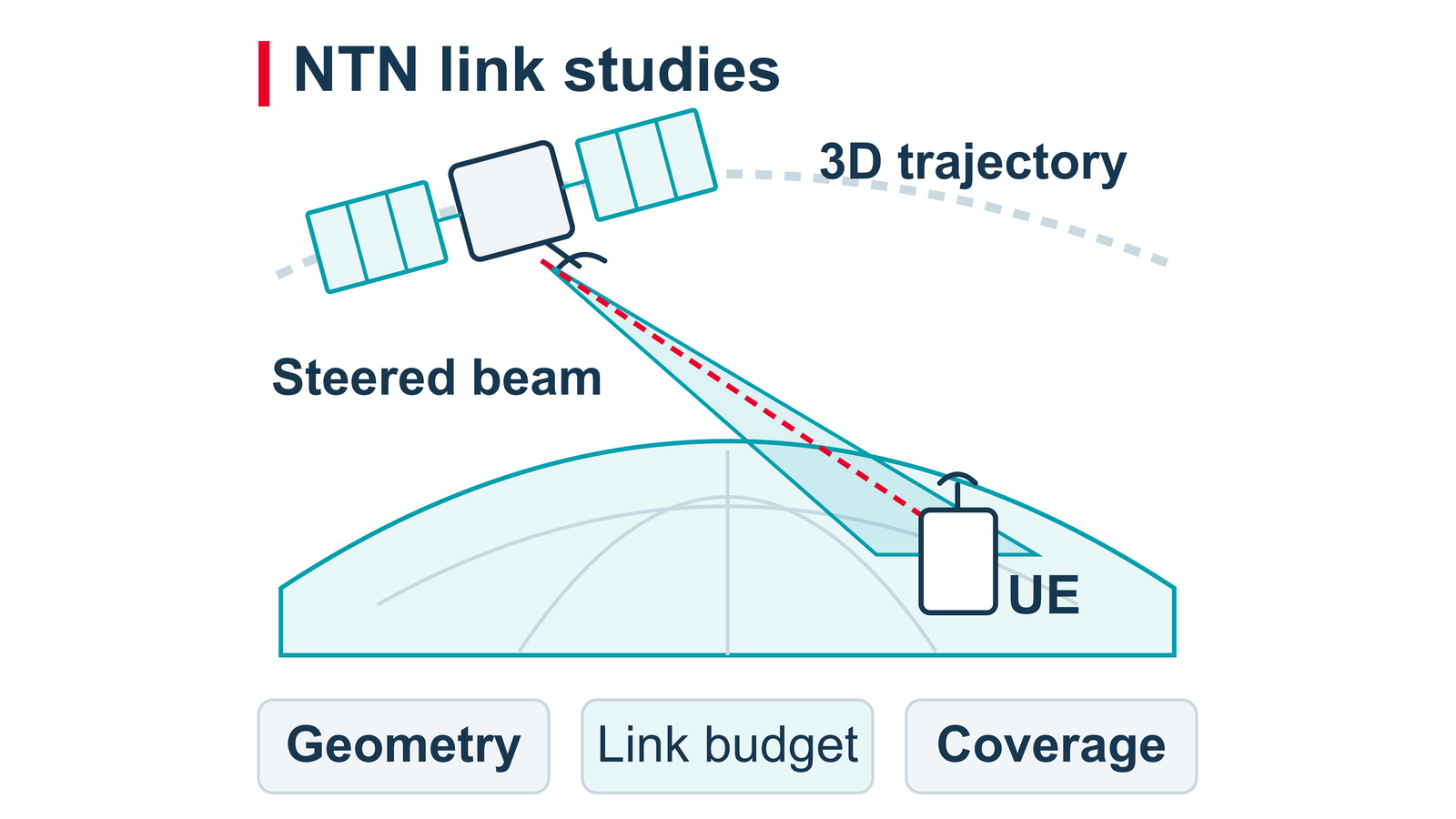
Relate satellite geometry and beam steering to link and coverage studies.

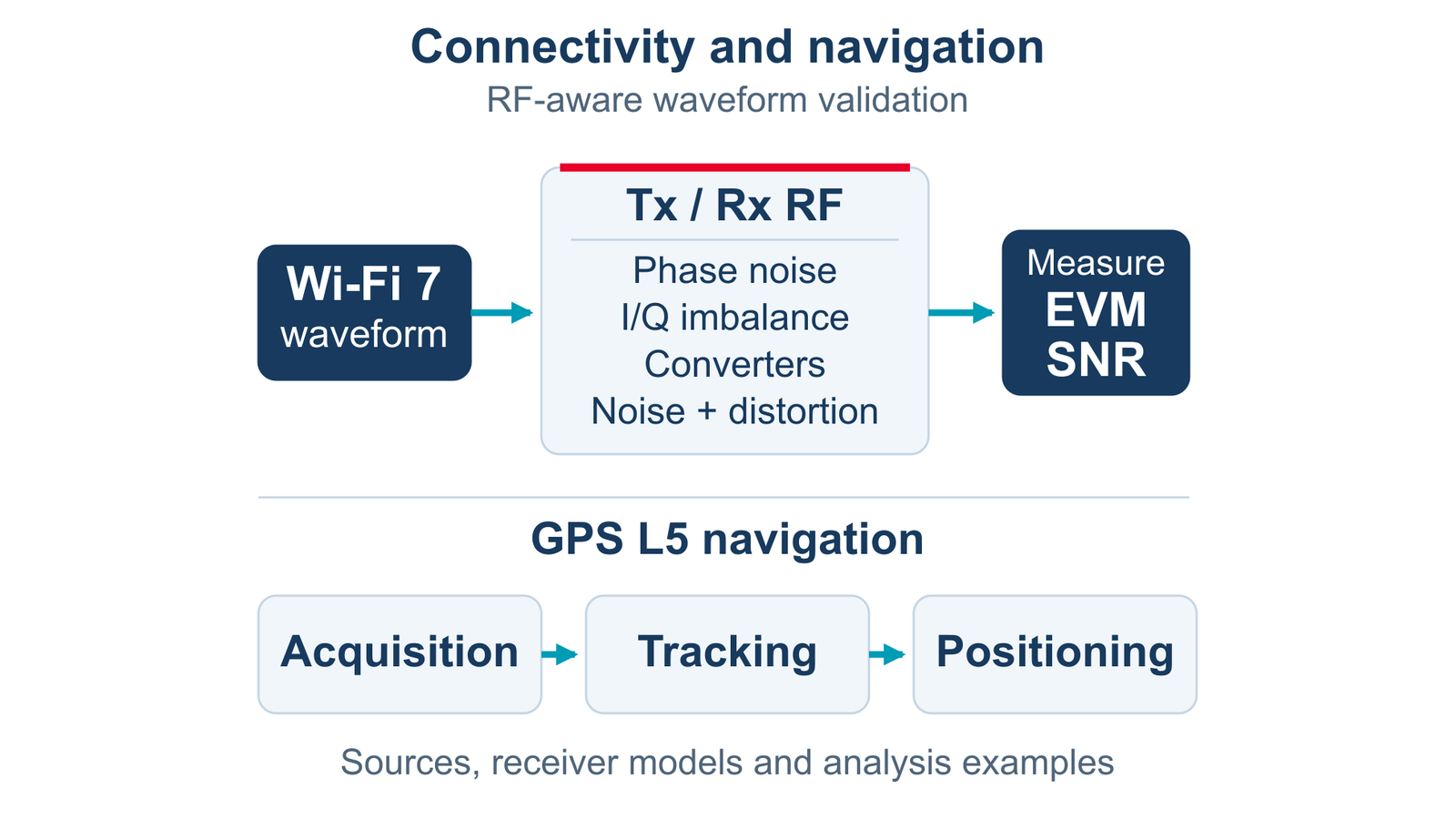
Evaluate RF impairments in Wi-Fi waveforms and explore GPS L5 reception.
Connectivity and Navigation Updates
New Wi-Fi 7 transmit and receive examples evaluate oscillator and LO phase noise, I/Q imbalance, converter impairments, noise and nonlinearities using EVM and SNR analysis. Wi-Fi 7/8 waveform models add clearer configuration diagnostics, while Wi-Fi 8 research models expand distributed resource-unit bandwidth-gap options. New GPS L5 sources, receivers and examples support signal acquisition, tracking and positioning. Existing UWB capabilities support pulse-quality analysis and transmit spectral-mask evaluation.
ISAC and RIS Studies for 6G Research
Explore integrated sensing and communications (ISAC) and reconfigurable intelligent surfaces (RIS) using the modeling capabilities established in SystemVue 2026. Combine waveforms, targets, RF impairments and programmable propagation behavior to study communication and sensing tradeoffs. SystemVue 2026 Update 1 also enhances radar examples with Swerling radar-cross-section fluctuations and multi-target search scenarios. Emerging Wi-Fi 8 and pre-6G models support research as specifications evolve.

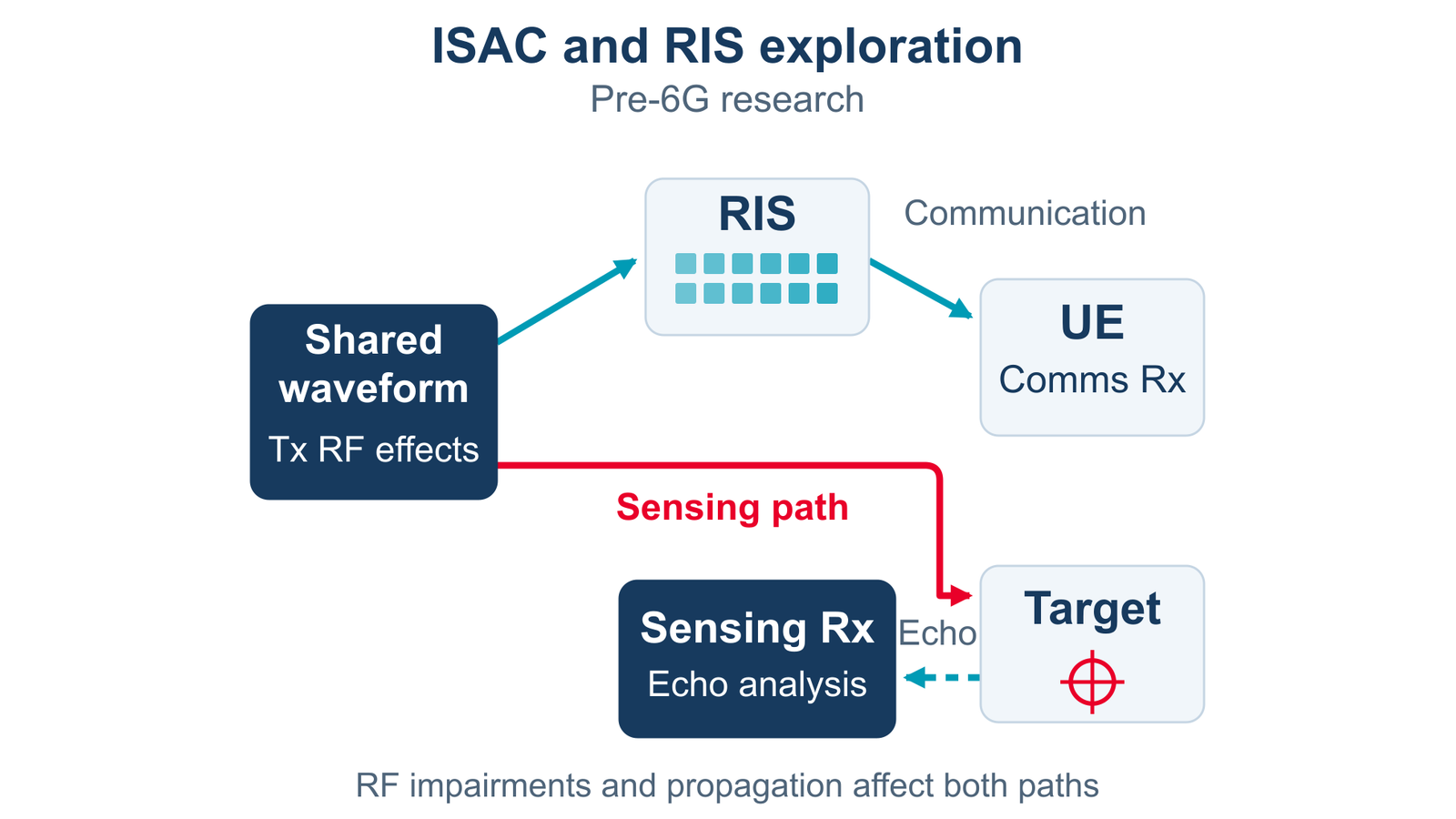
Shared waveforms support communication and sensing studies.

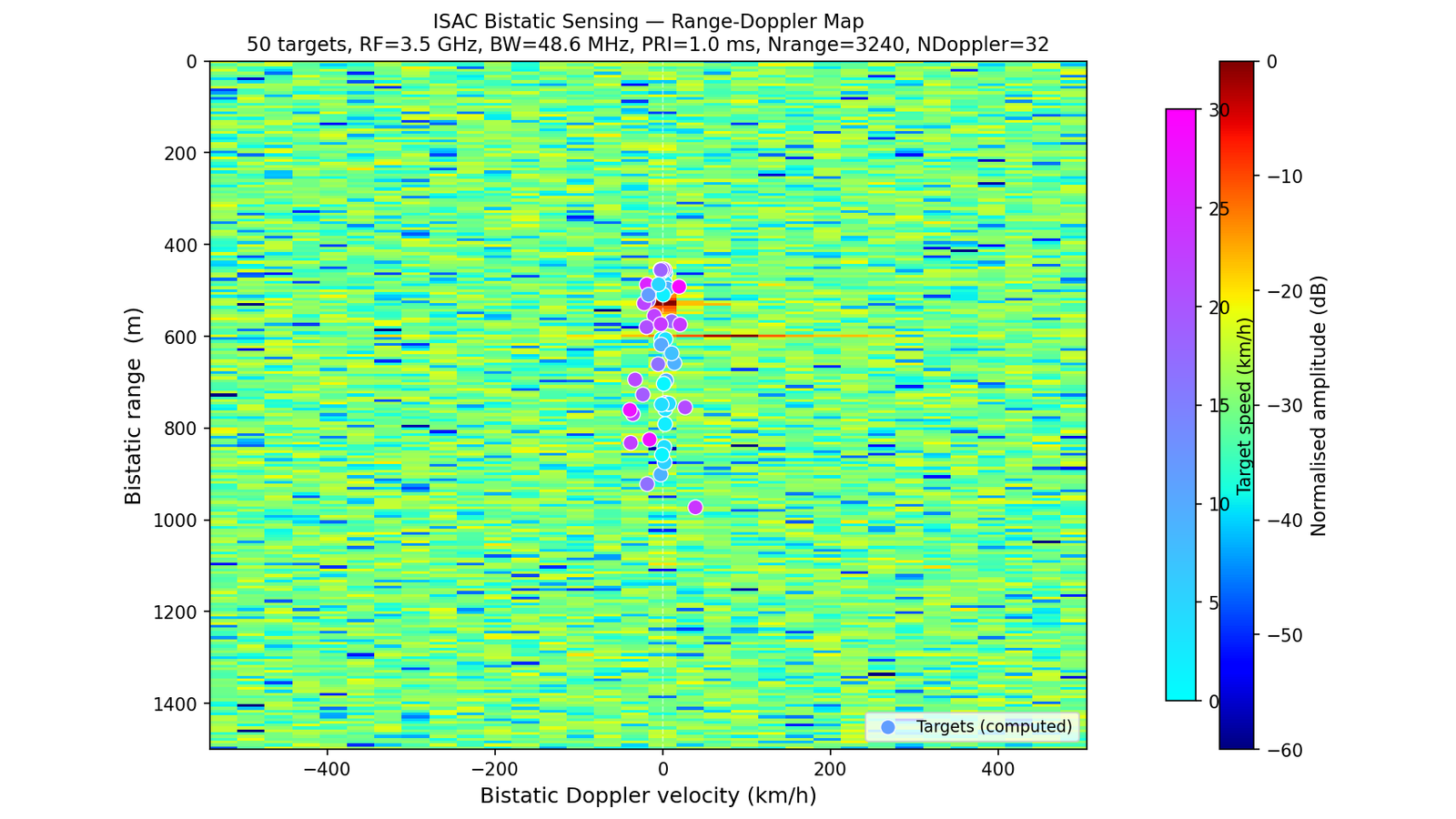
Bistatic ISAC range-Doppler visualization from the supplied example.

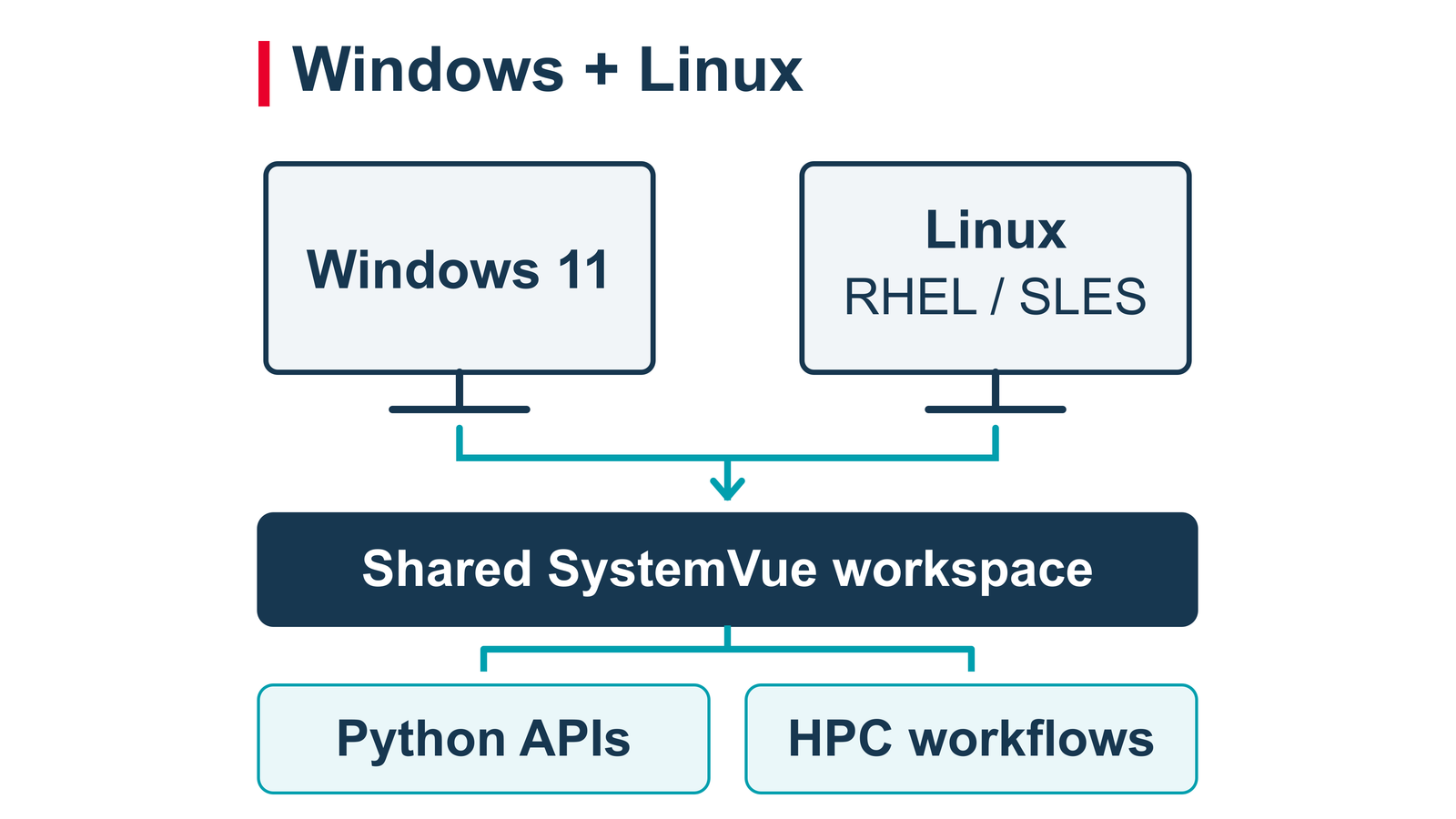
A shared modeling workflow across supported Windows and Linux platforms.
Windows and Linux Workflows
Use the modern SystemVue workspace on Windows or supported Linux platforms for schematic modeling, analysis and results visualization. A consistent ribbon interface, light and dark themes, multi-window workflows and portable projects help teams work across operating systems. Python automation and supported headless or distributed simulation configurations extend repeatable studies into enterprise and HPC environments.²
SystemVue 2026 Update 1 supports Windows 11 and supported releases of Red Hat Enterprise Linux 8 and 9 and SUSE Linux Enterprise Server 15. Consult the release-specific platform matrix and installation requirements before deployment.
Get Started
Download SystemVue 2026 Update 1 or request a trial to explore AI-assisted workflows and RF digital twins for communication, sensing, satellite and phased-array systems.
Request a Free Trial | Download Latest Version
Looking for another release? Open the download page and select Previous Versions.
Resources
SystemVue Documentation: Product help, examples and API information
2026 Update 1 Release Notes: Detailed enhancements, compatibility changes and known issues
MCP in SystemVue: Connect AI clients and configure automation workflows
EDA Chat Inference Server: Desktop and Enterprise deployment options
Supported Platforms: Operating-system versions and dependencies
Platform and deployment notes
1 EDA Optimizer and EBM Importer are currently available on Windows only. Aerospace Defense Designer and Keysight 89600 VSA features are unavailable on Linux. Some external-tool integrations also have platform-specific restrictions.
2 A SystemVue Core Platform license is required to launch the SystemVue MCP server. Simulation engines, application libraries, distributed simulation and connected tools require the applicable licenses. MBSE and external-tool workflows use project-specific integrations.
3 EDA Chat requires inference-server setup. The single-user Desktop inference-server installer is Windows-only; Enterprise deployment uses supported Kubernetes infrastructure. Model-provider and connectivity requirements depend on the selected deployment.