您希望搜索哪方面的内容?
RSoft CAD Environment
Unified computer-aided design (CAD) platform for RSoft Photonic Device Tools

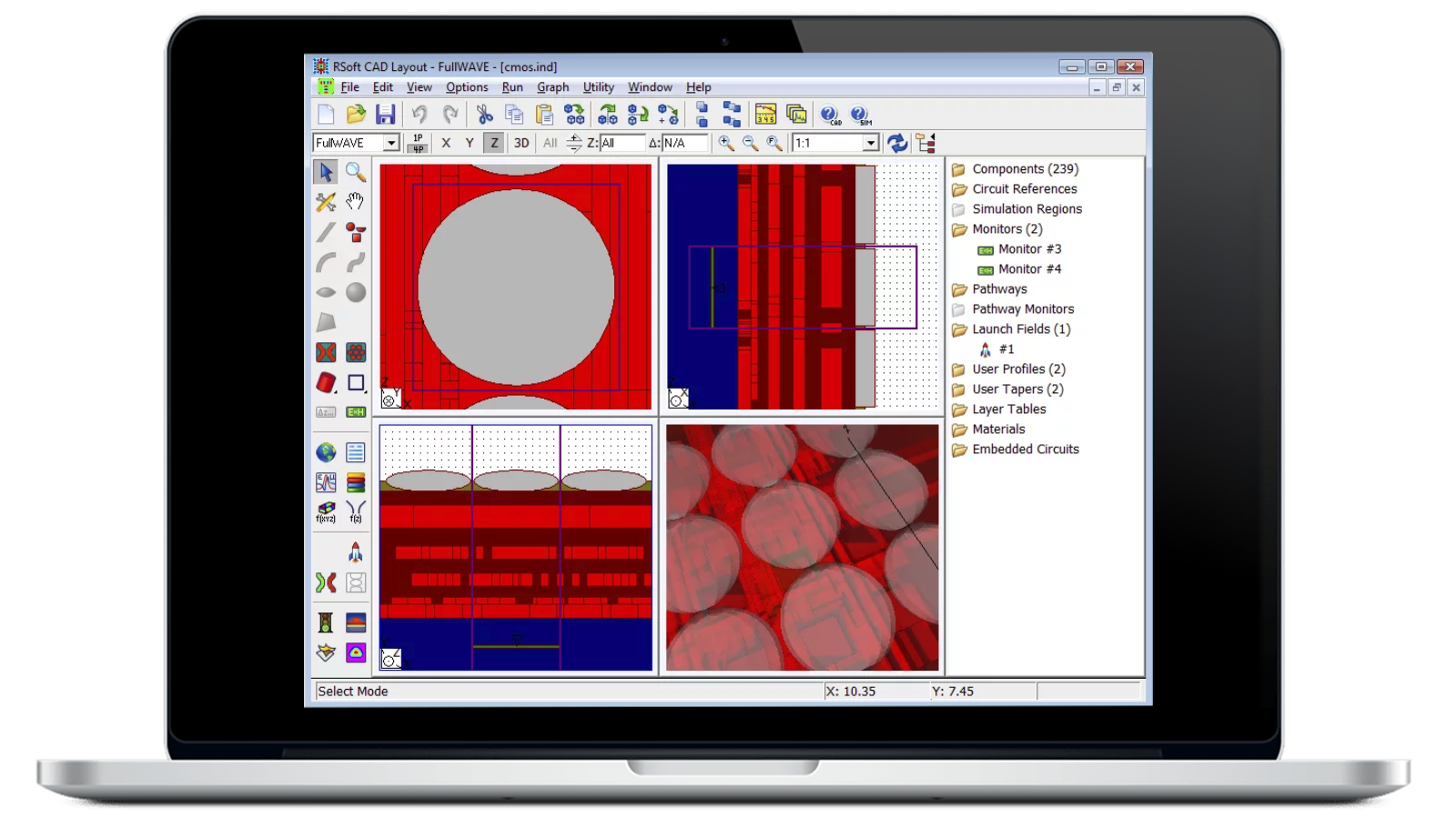
Control Your Passive Device Tools from One Place
Designing photonic devices is a complex process that involves several distinct simulation approaches. Easily design waveguide devices, optical circuits, and other photonic devices within the RSoft CAD Environment. This unified platform acts as a control program for all RSoft passive device tools, including BeamPROP, FullWAVE, BandSOLVE, GratingMOD, DiffractMOD, FemSIM, and ModePROP.
The RSoft CAD Environment defines the important input required by the material properties and structural geometry of the device you plan to study.
- Create virtually any geometry with the highly flexible design environment.
- Gain fine control over device layout and simulation with an easy-to-use, streamlined user interface.
With RSoft CAD Environment, you can maintain the desired logical arrangement with an extremely flexible system and unified control.
Key Features of RSoft CAD Environment


Included with RSoft passive device tools
The RSoft CAD Environment is included with each of RSoft’s passive component simulation tools. All tools share a common interface.


Object-oriented design
Easily modify an entire design with formulas defining each component’s angle. Modify the whole circuit by changing a single variable’s value.


Edit and view options
View the structure along the X, Y, and Z axis with 3D editing options. Show the X, Y, Z, and rotatable 3D views at once with multi-pane mode.


Utilities
Get utilities for custom pre- and post-processing, as well as common periodic, grating, and arrayed waveguide grating (AWG) structures.


WinPLOT program
The RSoft CAD Environment includes WinPLOT, RSoft's technical graphing program. Customize the plot with a comprehensive set of commands.


Hierarchical Layout tool
Build arbitrarily complicated structures from smaller components with the Hierarchical Layout tool included in the RSoft CAD Environment.
Need Support for the RSoft CAD Environment?
Explore Blogs






Featured Resources












RSoft CAD Environment – FAQ
The RSoft CAD Environment is the core program of Keysight’s RSoft Photonic Device Tools. It allows you to create systems for the design of waveguide devices, optical circuits, and other photonic devices.
The RSoft CAD Environment is designed to accommodate the unique needs of photonic devices and circuits. Easily select fundamental objects such as straight, tapered, and curved components, lenses, and polygons from the toolbar.
Then, graphically add these objects to the circuit using the mouse. In addition to standard objects, the RSoft CAD Environment allows you to create customized components using mathematical equations or data files. You may specify component positions directly, either absolutely or through relative offsets with respect to any other component.
At any time, you can select and move, scale, delete, or reinsert one or several components. This unique design approach provides an extremely flexible system, making it possible to maintain the desired logical arrangement.
You can access each component’s individual set of properties with just a right click of the mouse. Parameters include shape information and optical properties such as refractive index profile type and value. This unique object-oriented input model is extremely flexible.
You can specify each parameter of a component (for example, position coordinates, width, index) by an arithmetic expression involving user-defined variables, rather than simply being a constant number. This allows you to modify an entire design by using formulas to define each component's angle. You can also modify the entire circuit simply by changing the value of a single variable without having to edit multiple parts of the structure.